March 20 6:00 AM
Stop at CWI Main Campas in Nampa will be closed due to construction. Temporary stop will be in the parking lot in front of the Main Academic Building

Stop at CWI Main Campas in Nampa will be closed due to construction. Temporary stop will be in the parking lot in front of the Main Academic Building
VRT Access, Beyond Access, and On-Demand share vehicles for more efficient trips. Learn more at ridevrt.org/comingling.
Route 10 stop at State and Ellen's Ferry closed. No temp stop placed.
Route 10 temporarily stops upstairs at Main & 8th instead of downstairs at Main Street Station due to construction. Visit ridevrt.org/news for more information.
Route 16 temporarily stops upstairs at Main & 8th instead of downstairs at Main Street Station due to construction. Visit ridevrt.org/news for more information.
Route 2 Inbound stop at Broadway and Targee is closed and temp stop has been placed on the near side.
Route 9 stop at State & Pierce Park is closed due to road construction. No temp stop placed.
Route 9 OB stop at State and Ellen's Ferry closed. No temp stop placed.
Route 16: Stops on 1st & Idaho and 1st & Bannock will be closed. Please use the bus stop on Main & 1st.
VRT On-Demand allows people to get to more places by booking a ride through the VRT Booking mobile app, website, or by calling VRT Customer Service. Riders are picked up near their location and dropped off near their destination. VRT On-Demand offers many more places to go at the cost of a bus fare — works like a taxi, runs like a bus!
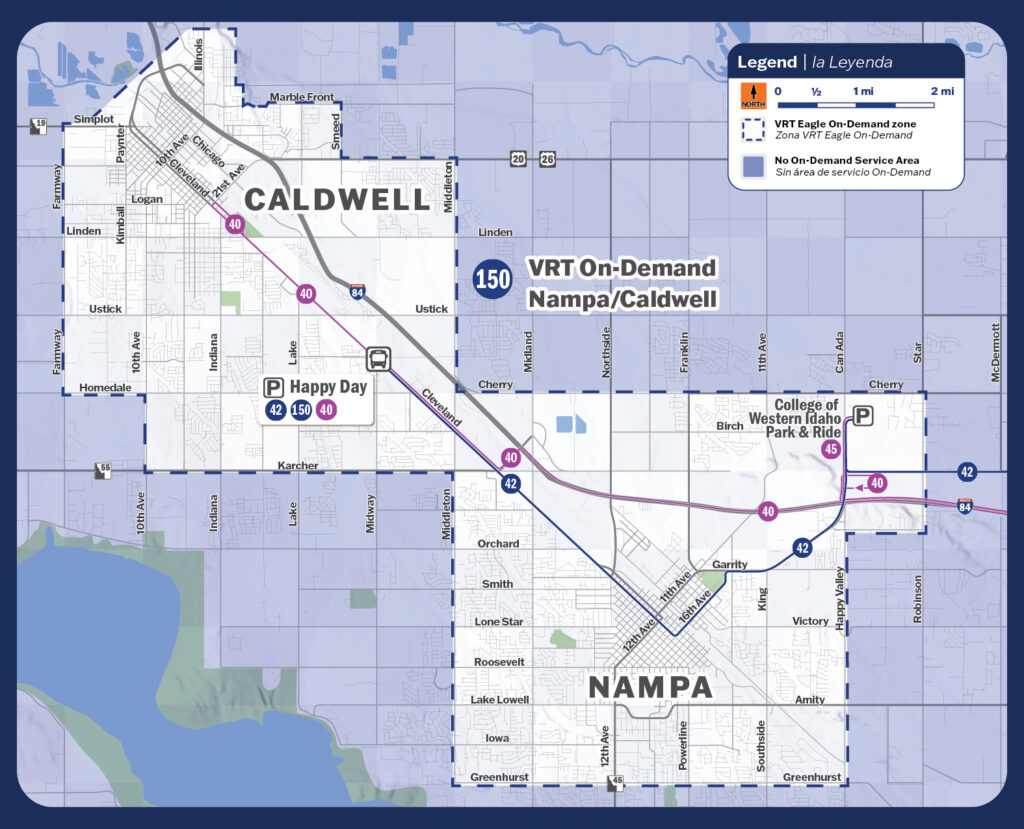
Caldwell:
Nampa:
VRT offers three convenient ways to book your VRT On-Demand ride.

Step 1: Download the “VRT Booking” app through your app store. Follow the set-up instructions.


Step 2: Enter your pickup address and tap “Set Pickup.”
Step 3: Enter your destination address and tap “Set Dropoff.”
Step 4: Choose your ride option and tap “Book.”
Step 5: Meet your ride at the location indicated in the app.
Información en español disponible por internet, en la aplicación y por teléfono.


If you need help booking your ride, give Customer Service a call.
